
First steps
Open platendoos
- macOS: open platendoos from
~/Applications(Finder: Go > Home > Applications). Its icon is rekordbox's, inverted. The first time, macOS asks whether it may use the microphone: click Allow. - Windows: start platendoos from the Start menu (or the desktop shortcut).
It's rekordbox, with your own library, playlists and settings. The first launch takes a few seconds longer in the background: the neural networks are loaded one after another (Beat This!, HTDemucs, the genre model, about 6 s together). rekordbox is usable straight away; a track loaded within those seconds waits for the model it needs.
Plain rekordbox is still there
Open rekordbox the usual way whenever you want it without the mods. Don't run both at once.
The PLATENDOOS chip
At the bottom left, next to the rekordbox logo, is the PLATENDOOS chip. That's how you tell a modded rekordbox from the plain one.

- Hover over it to see rekordbox's and platendoos's versions.
- Click it for its window.
- It steps aside the moment rekordbox shows a message in its bottom bar, and comes back when the message is gone.
- Its blue icon pulses orange when the config file says something else than what is running: a mod was switched on or off. Restart rekordbox to apply it; the tooltip and the window say Restart rekordbox to apply: and list the mods that change.
- On a rekordbox version platendoos wasn't checked on, it says untested rekordbox build: some mods may be off.
The chip's window
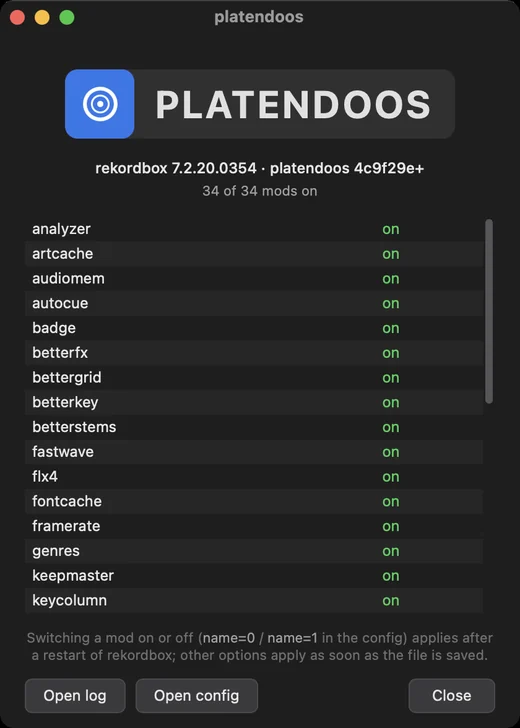
The window shows:
rekordbox's and platendoos's versions;
how many mods are on, and every mod with its state:
State Meaning on Running. off in config ( name=0)You switched it off. on → off after restart, off → on after restart The config changed its switch; restart rekordbox to apply. off: not available in this build Something it needs wasn't found in this rekordbox version, so it switched itself off. Restart rekordbox to apply: … when the config changed a mod's switch;
Open log and Open config.
Where things are
| macOS | Windows | |
|---|---|---|
| Config file | ~/Library/Application Support/rekordbox-mods/config.txt | %APPDATA%\rekordbox-mods\config.txt |
| Log | ~/Library/Logs/rekordbox-mods.log | %LOCALAPPDATA%\rekordbox-mods\rekordbox-mods.log |
| Caches | ~/Library/Caches/rekordbox-mods/ | %LOCALAPPDATA%\rekordbox-mods\cache\ |
The chip's window opens the log and the config for you.
The config
Every mod is on by default. The config is a plain text file that lists every mod and option with its default, each on a line starting with # (remove the # to use it):
# ---- framerate ----
# Only runs the screen at full frame rate while a deck plays or you're using the computer.
#framerate=1
#   seconds without input before the UI drops to 30 fps
#framerate_idle_after=3
Put name=0 on a line to switch a mod off, e.g. framerate=0. Options apply as soon as you save the file (it is re-read every couple of seconds); a mod's own on/off switch applies at the next start of rekordbox. Everything is in Settings and config.txt.
The log
Everything the mods do is logged: which mods loaded, what each analysis found, where a deck load's time went, when a cache drive was slow. Its first line says which rekordbox build it is and how the mods found their way around in it:
rbmods: rekordbox build 4AF5D59D5EC937DCBD893FBC84D970AD (checked): 420 addresses, 167 fieldsThings to try first
- Analyse a playlist. Right-click a playlist (a Spotify one works too) and choose Open analysis window, then Analyze. See analyzer.
- Load an analysed Spotify track. Its waveforms, grid and key are there the moment it's on the deck. See quickdeck.
- Sort by two columns. Click BPM, then Key: tracks are sorted by BPM and, within one BPM, by key. See multisort.
- Right-click a track. No greyed-out items, and a platendoos submenu with the mods' windows. See tidymenu.
- Turn a stem down on a Spotify track. It has stems, which plain rekordbox never gives a Spotify track. See stemcache.
The mods' menus
A playlist's right-click menu gets these items; the actions are in the windows they open:
| Item | Window | Mod |
|---|---|---|
| Open analysis window | Playlist Analysis | analyzer |
| Open stems window | Stem Separation | stemcache |
| Open auto cues window | Auto cues | autocue |
| Open genres window (local playlists) | Genres | genres |
| The same windows open on just a few tracks: select them in the track list and right-click. With | ||
| tidymenu the track menu has a platendoos submenu with Analysis window, Auto cues window, | ||
| Stems window and Genres window, and Re-analyze track | ||
| (Re-analyze 5 tracks) next to it. The window then lists only those tracks, as "5 tracks from" the playlist, and | ||
| everything it does is limited to them. |
Mods work on their own: when a feature needs another mod (HTDemucs stems need betterstems), its window says so.