
multisort
Sort the track list by several columns at once: BPM, then key within each BPM.
PlatformmacOS and Windows
GroupBrowsing and playing
Switch
multisort=0 turns it off (restart rekordbox)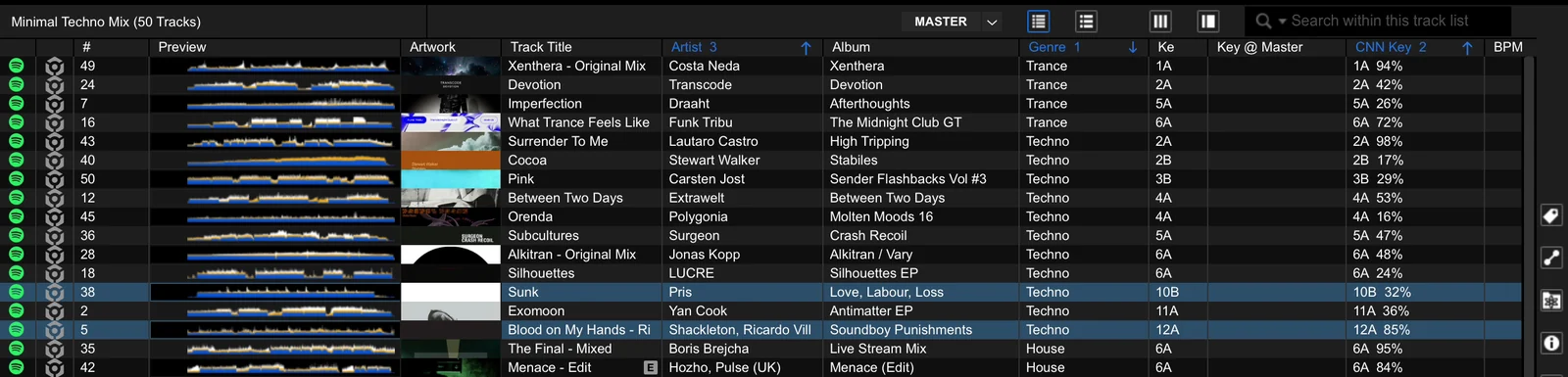
Using it
- Click a column header to cycle it through ascending, descending and off.
- The columns that are on sort together, in the order you turned them on: click BPM, then Key, and tracks are sorted by BPM and, within one BPM, by key.
- The first one is rekordbox's own sort column (with its arrow). With two or more, each sorted header is drawn blue with its place and direction ("BPM 1", "Key ▼2").
- Turn a column off with another click (or two) on it; the others keep sorting.
- A list sorted by its track order (#) starts over at the column you click, as before.
- With keycolumn, Key @ Master re-sorts within the other sorted columns as the master tempo moves.
Ties within all sorted columns fall back on rekordbox's own tie-breakers (artist, album, ID).
Options
| Option | Default | What it does |
|---|---|---|
multisort | 1 | 0 gives rekordbox's own one-column sort back (restart). |