
flx4
Makes a Pioneer DDJ-FLX4 a four-deck controller with stems, using SHIFT combinations the FLX4 doesn't use itself.
flx4=0 turns it off (restart rekordbox)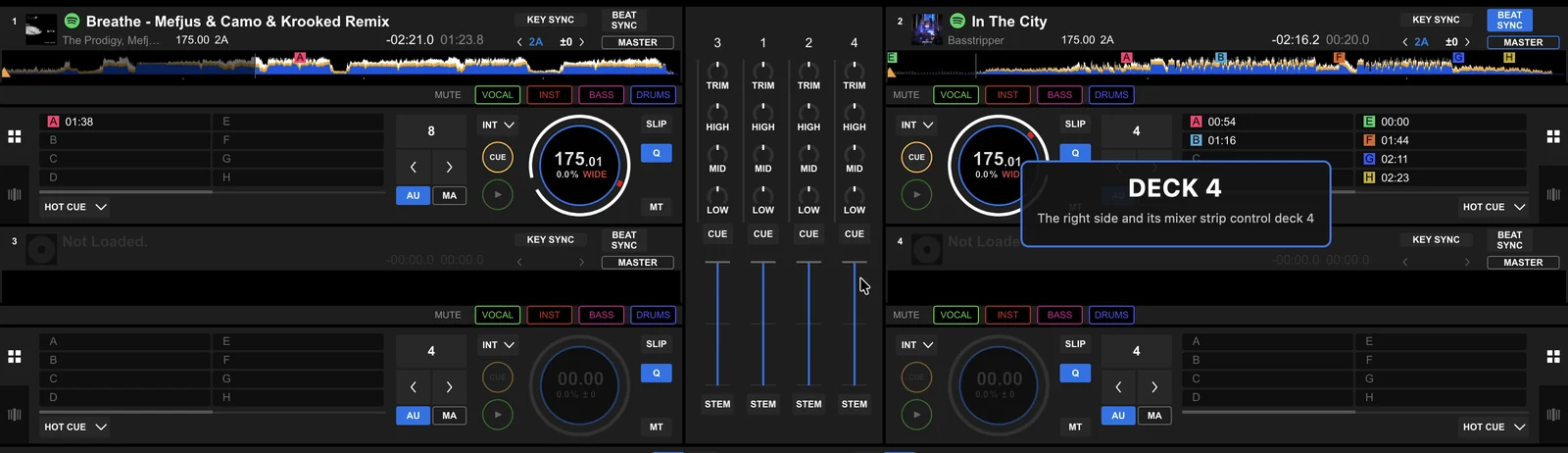
The combinations
| Press | What it does |
|---|---|
| SHIFT + PLAY | That side switches deck: left 1 ↔ 3, right 2 ↔ 4. Its mixer strip (TRIM, EQ, CFX filter, fader), jog wheel, pads, loop buttons and beat FX go along, and the controller's lights and level meter show the new deck. |
| SHIFT + LOOP IN | The pads become STEMS pads: 1–4 turn vocal, inst, bass and drums on and off (lit while playing), 5–8 pick the stems the beat FX applies to. Press it again, or any pad mode button, to go back. |
| SHIFT + LOOP OUT | The EQ knobs control the stems instead: HI vocal, MID inst, LOW drums. Press it again for EQ. |
| SHIFT + SMART FADER | Switches between rekordbox's 2 and 4 deck layouts. |
Each switch shows a short message over rekordbox, over the deck it's about. The step-by-step setup and a practice routine are in DDJ-FLX4 with four decks.
Nothing jumps
- With four decks, rekordbox's own on-screen mixer opens so you can see every channel's settings, and the two channels the FLX4's strips are on are outlined. The decks the two sides control are shown by their deck numbers in blue (macOS).
- A knob or fader only takes over a deck once it reaches that deck's setting. Until then an orange mark on the on-screen mixer shows where the FLX4's knob is: turn it to the on-screen value to take over.
- Switching a side never changes a deck's tempo. The tempo fader also takes over only once it reaches the deck's real tempo, also when sync moved the tempo meanwhile. rekordbox's own habit of setting a newly controlled deck to the fader position it remembers for it (which made a sync master, and every deck synced to it, jump to an old tempo in the middle of a mix) is switched off (
flx4_keep_tempo=0gives it back). - The on-screen mixer strips are laid out like the FLX4's (a smaller TRIM), with each channel's CFX filter knob under LOW, so all four filters are visible.
Beat FX
The beat FX CH SELECT lever picks sides rather than channels: 1 is the deck the left side controls (1 or 3), 2 the right side's (2 or 4), 1&2 both. The FX select, beat, LEVEL/DEPTH, on/off and RELEASE FX buttons work as usual on whichever decks that is, and follow a side when it switches deck.
Stems
Stems need rekordbox's STEMS feature: Preferences > Extensions > STEMS. While it's off, the stems combinations just say so and leave the pads and knobs alone. Spotify tracks get stems when stemcache is on.
The mapping
Decks 3 and 4 use the same MIDI channels and mapping rows as the FLX4's four-deck sibling, the DDJ-FLX6. The patcher (its DDJ-FLX4 mapping option, on by default) adds those to rekordbox's FLX4 mapping, plus rows for stems. Where rekordbox's FLX4 support only knows two decks (jog wheels, pad mode lights, level meters, loop lights), the mod fills in decks 3 and 4.
- macOS: the mapping goes into the platendoos copy; rekordbox's own isn't touched.
- Windows: rekordbox's mapping file is changed (Windows asks for permission); the original is kept as
DDJ-FLX4.midi.csv.originaland put back on uninstall.
Tested on a real FLX4.
Options
| Option | Default | What it does |
|---|---|---|
flx4 | 1 | 0 switches the mod off (restart). |
flx4_mixer | (empty) | fixed keeps the mixer strips and beat FX on channels 1 and 2. |
flx4_keep_tempo | 1 | 0: a deck a side switches to takes the tempo rekordbox remembers its fader at (rekordbox's behaviour). |
flx4_device | DDJ-FLX4 | MIDI device to map (for testing with another device using the same mapping). |
flx4_log | 0 | 1 logs every MIDI message in and out. |
flx4_meterlog | 0 | 1 logs the level meters (for debugging). |
Related
DDJ-FLX4 with four decks · stemcache · keepmaster · xfadelock · betterfx