
autocue
Sets hot cues A–H on a playlist's tracks from their arrangement: intro, build, drop, breakdown, build 2, drop 2, outro, fake drop. Spotify tracks too.
autocue=0 turns it off (restart rekordbox)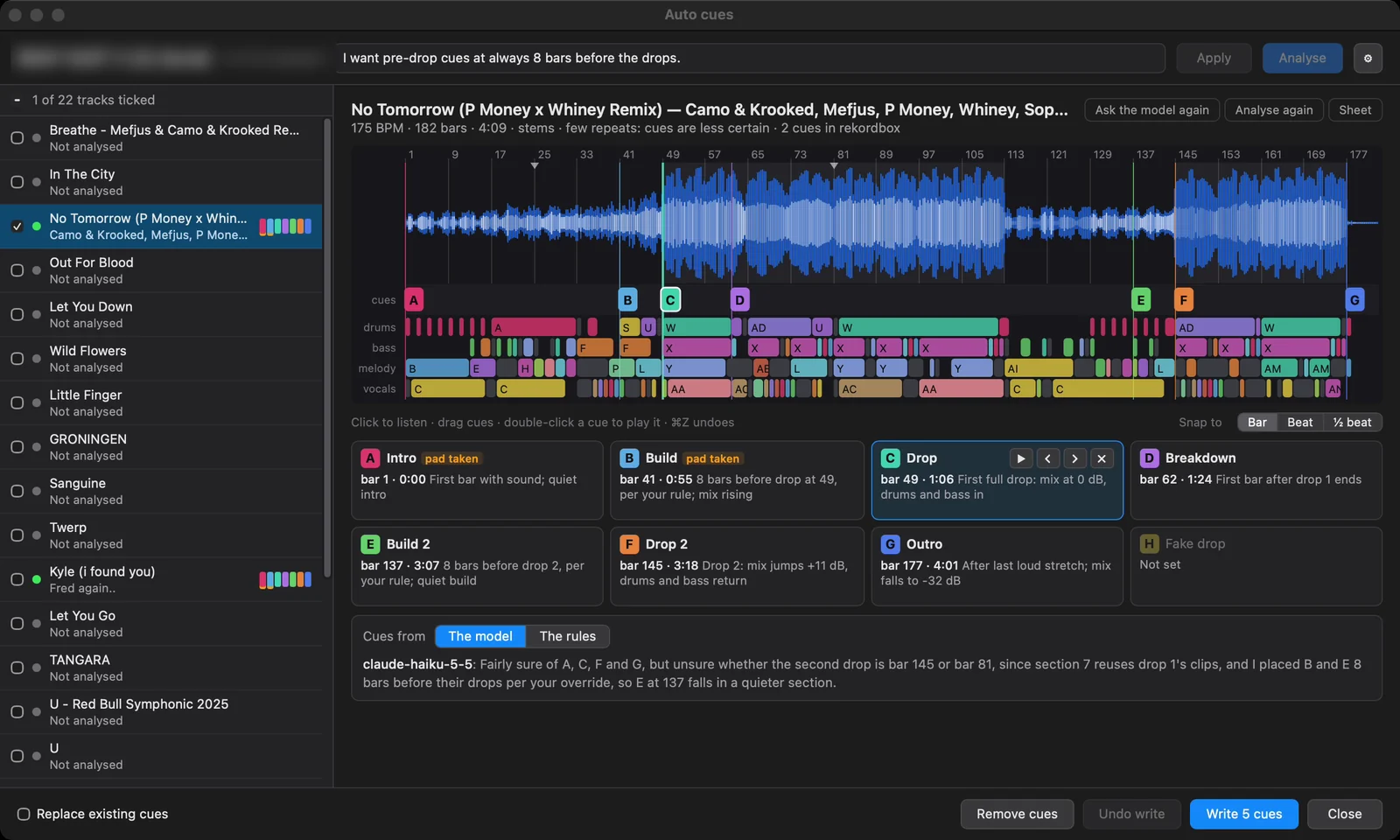
How it works
One batch run, then fine-tuning:
- Analyse reads each ticked track and works out its arrangement: which bars repeat which, per stem (drums, bass, melody and vocals, from betterstems' HTDemucs) or, without it, in three bands of the mix. It writes that out as a sheet: the track's arrangement as text.
- A language model reads the sheet (it never hears the track) and places the cues, following the instructions you type, e.g. "build cues always 8 bars before the drop".
- You check and fine-tune each track in the same window.
- Write cues sets them as hot cues in rekordbox. Nothing reaches rekordbox before that, and Undo write takes it back.
Without a model set up, or if the model fails, the built-in rules place the cues. Analyses, the model's answers and your edits are remembered (in an autocue folder next to the config), so the window opens where you left it.
Not on a deck load: auto cues are only made from their window.
Using the window
Right-click a playlist and choose Open auto cues window (or select some tracks and use the track menu).
- The track list (left): tick the tracks to analyse. Each shows whether it's analysed and the colours of the cues it has.
- Instructions (top): type how you want the cues placed; Apply asks the model again about every track with them. ⚙ sets up the model, the key and the stems.
- Analyse runs the ticked tracks (three at a time by default; one of them separates stems at a time).
- The track view: the waveform with bar numbers, the cue lane, and each stem's sections (clips with the same letter are copies of each other). Its header says the BPM, bars, length, whether stems or mix bands were used, and how many cues are already in rekordbox.
- Click the waveform to listen from there; double-click a cue to play it.
- Drag a cue to move it; Snap to Bar, Beat or ½ beat sets the step (← → move the selected cue; ⇧ moves four times as far).
- Click an empty spot in the cue lane to put the selected pad there; ⌫ removes a cue.
- ⌘Z / Ctrl+Z undoes an edit, ⇧⌘Z redoes.
- Ask the model again, Analyse again, Sheet (what the model reads).
- The cue cards: one per pad A–H, with bar and time and the model's (or the rules') reason. pad taken means that pad already holds another cue in rekordbox.
- Cues from The model / The rules: switch a track between the two sets.
- Footer: Replace existing cues (pads that already hold a cue get the new one), Remove cues (removes every hot and memory cue from the ticked tracks; Undo puts them back), Undo write, Write cues.
Stems already separated (stemcache) are read from disk, and stems autocue separates are kept for the decks. A Spotify track's audio is read from the stream into memory by spotifyaudio, and its stems are only kept in memory: nothing of a Spotify track is written to disk.
The model
Two ways, set up under ⚙:
| Provider | Setup | Notes |
|---|---|---|
| OpenRouter (default) | Paste your OpenRouter key in the window. It is kept in the system's keychain, not in the config. | Any model from openrouter.ai/models (autocue_model). The window shows the model cost this session. |
| Claude Code on this computer | Install the Claude Code CLI and log in. No key. | Uses your Claude Code login, and counts toward that plan's usage. The window lists the models it offers. |
Without either, the built-in rules place the cues.
Options
| Option | Default | What it does |
|---|---|---|
autocue | 1 | 0 switches the mod off (restart). |
autocue_provider | openrouter | openrouter, or claude: the local Claude Code CLI. |
autocue_model | anthropic/claude-haiku-5.5 | Any model id from openrouter.ai/models. |
autocue_claude_model | haiku | Claude Code's model (an alias or a full name). |
autocue_claude_path | (empty) | The claude program, if it isn't found by itself. |
autocue_stems | 1 | 0 analyses three bands of the mix instead of stems (faster: no separation). |
autocue_parallel | 3 | Tracks analysed at once (one of them separates stems at a time). |
Platform notes
- Runs on both. On Windows it was tested writing 220 cues; the Claude Code option builds there but hadn't been run on Windows yet.
- Analysing per stem needs betterstems and its model; without it the window says so and uses three bands of the mix ("Slower (each track is separated first), but the model sees the real parts").
Tips
- Type your rules once in the instructions box: "build cues always 8 bars before the drop", "no fake drop". The model follows them; the rules can't.
- "few repeats: cues are less certain" in a track's header means its sections don't repeat much: check that one.
- Tick a few tracks first, check them, then do the rest.