
analyzer
Open analysis window in any playlist's menu analyses that playlist, Spotify ones too. It runs several tracks at once, in a window that shows progress per track with pause, stop and retry.
analyzer=0 turns it off (restart rekordbox)Why
rekordbox's own collection analysis refuses Spotify tracks, and analyses one track at a time. So a Spotify track is only analysed when you load it on a deck, and you wait for it there. The analysis window analyses a whole playlist ahead of time, Spotify or local, six tracks at once by default.
Using it
Right-click a playlist and choose Open analysis window, then Analyze.
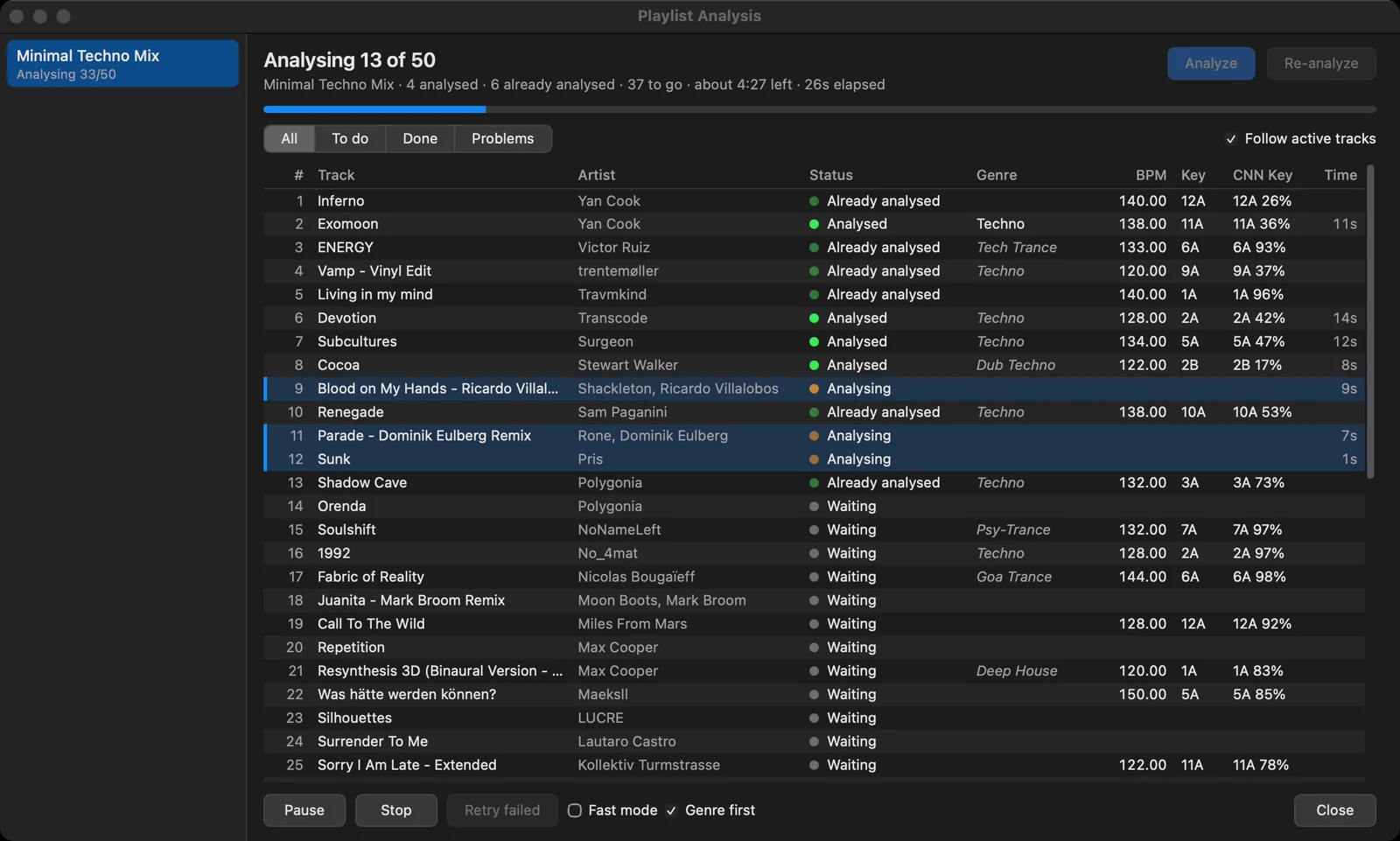
- Analyze analyses the tracks that aren't analysed yet; already analysed tracks are skipped.
- Re-analyze analyses every track again (rekordbox is told the existing analysis is outdated).
- The header says how far it is: analysed, already analysed, to go, time left and elapsed.
- Filters: All, To do, Done, Problems; Follow active tracks scrolls the list along.
- Columns: Track, Artist, Status, Genre (with genres), BPM, Key, CNN Key (with betterkey), Time.
- Pause, Stop, Retry failed, Close.
- Fast mode: skip rekordbox's optional analyses (phrase, vocal detection, similarity) for tracks analysed here. rekordbox adds them later, when you load the track to play it.
- Genre first (with genres): the genres mod listens to each track first, its genre picks the tempo the beat grid is made at (dubstep at 140, not 70; drum & bass at 174, not 87), and an empty Genre field is filled with it. Off: the genre still picks the tempo, but isn't written.
The left side lists the runs; the window opens by itself when a run starts. If you open another list meanwhile, the run pauses, and resumes when the playlist is shown again. After a restart, the playlist analysed last is opened again.
Just a few tracks
Select tracks in the track list and right-click: Re-analyze track (or Re-analyze 5 tracks) analyses them again right away, without rekordbox's Analysis Setting dialog. Analysis window in the platendoos submenu (with tidymenu; otherwise Open analysis window for 5 tracks) opens the window on just those.
Spotify tracks
- A Spotify playlist track that isn't in the collection yet is imported first (as playing it does), since rekordbox only analyses collection tracks.
- Spotify allows about 30 track downloads a minute. When Spotify says its streaming limit is reached, no new Spotify track is started until the wait it gives is over; the refused tracks are queued again instead of failing.
- At most 3 Spotify tracks are loaded at once (
analyze_streams), with at least 4 s between two loads (analyze_gap), to spare the streaming service. - Spotify tracks are analysed from the stream, in memory: nothing of their audio is written to disk.
- Deck loads made for the analysis don't count as played: they don't turn the track green in the list.
During a set
While a deck is playing, a run takes one track at a time (analyze_live=1), so analysing during a set doesn't take the cores the audio needs. analyze_live=0: the run waits until the decks have stopped.
A run also stops when the disk has less than 5 GB free (analyze_min_free_gb).
Options
| Option | Default | What it does |
|---|---|---|
analyzer | 1 | 0 switches the mod off (restart). |
analyze_parallel | 6 | Tracks analysed at once in direct mode (6 is fastest on a 10-core Mac). |
analyze_live | 1 | Tracks analysed at once while a deck is playing (0: the run waits for the decks to stop). |
analyze_fast | 0 | 1: skip rekordbox's optional analyses (phrase, vocal detection, similarity embedding); rekordbox adds those when the track is loaded for playing. The Fast mode checkbox. |
genres_on_analyse | 0 | 1: fill empty Genre fields when rekordbox analyses a track. The Genre first checkbox. |
analyze_direct | 1 | Analyse without decks. 0: load onto spare decks (analyze_decks) instead. |
analyze_decks | 3,4 | Decks to use when analyze_direct=0 (1-4). A deck you load or play is left alone. |
analyze_streams | 3 | Max Spotify tracks loaded at once, counting all decks. |
analyze_gap | 4 | Min seconds between two loads (spares the streaming service). |
analyze_import | 1 | Direct mode: import a Spotify playlist track that isn't in the collection yet; 0: such tracks fail. |
analyze_import_timeout | 20 | Seconds to wait for an imported track to show up in the collection. |
analyze_timeout | 90 (macOS), 180 (Windows) | Seconds before a track that never finishes is given up. |
analyze_start_timeout | 15 | Seconds before a track whose analysis never starts is retried. |
analyze_min_free_gb | 5 | Stop a run when the disk has less free space than this. |
analyze_window | 1 | Open the analysis window when a run starts. |
analyze_reopen | 1 | Open the playlist analysed last after a restart. |
bettergrid_min_fit | 0.6 | Beat This!'s fit below which rekordbox's grid is kept (see bettergrid). |
Tips
- Analyse a Spotify playlist before a set: every track then shows its waveforms, grid and key the moment it's on a deck.
- Cloud Analysis in rekordbox's preferences makes some tracks skip beat detection (and so Beat This!). Turn it off for Beat This! grids on every track.
- The timing mod adds how long each stage took to each track's line in the log.
Related
bettergrid · betterkey · genres · parallel · tfpool · streamio