
Installation
The platendoos patcher installs platendoos for the rekordbox already on your computer. It carries only the mods (no rekordbox files), so it can be sent to anyone with rekordbox 7. You don't need to build anything.
Download the latest release and pick the file for your computer:
| File | What's in it | |
|---|---|---|
| macOS (Apple Silicon) | platendoos-patcher-mac-<version>.zip | the app platendoos patcher |
| Windows (x64) | platendoos-windows-<version>.zip | a platendoos folder with platendoos patcher.exe, platendoos.exe and the mods |
What changed in each version: Release notes.
macOS
- Unzip
platendoos-patcher-mac-<version>.zipand open platendoos patcher. - Gatekeeper. The patcher isn't notarised, so the first time macOS refuses to open it. Open System Settings > Privacy & Security, scroll down to the message about platendoos patcher and choose Open Anyway. (Or right-click the app in Finder and choose Open.)
- Check. The patcher's window finds rekordbox and checks it before anything is changed (see The patcher's window below). The status top right says Ready to install.
- Choose your mods and options. Every mod has a checkbox, all on by default.
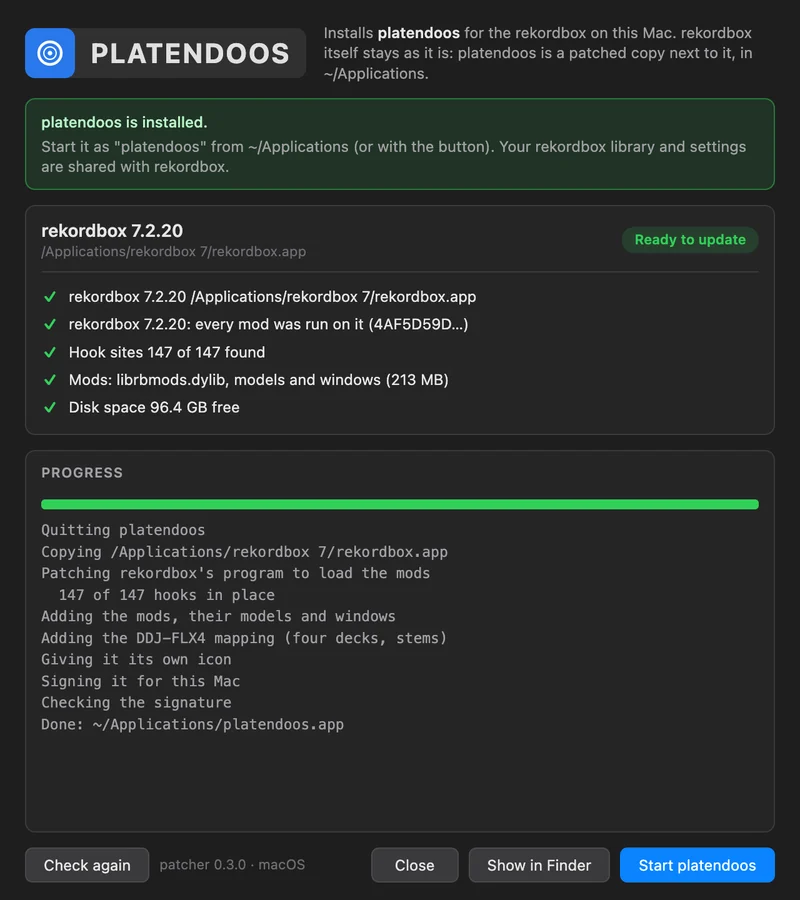
- Click Install. Each step shows as it goes: it copies rekordbox, patches its program to load the mods, adds the mods with their models and windows, the DDJ-FLX4 mapping and an inverted icon, and signs the copy for this Mac. It takes seconds.
- Click Start platendoos, or open platendoos from
~/Applicationslater (your home folder's Applications folder, not the main one). - The microphone prompt. On the first start macOS asks whether platendoos may use the microphone: click Allow. It asks once, because to macOS the signed copy is a new app. (Until that question is answered, rekordbox's start stands still, and after two minutes it goes on without sound. See Troubleshooting.)
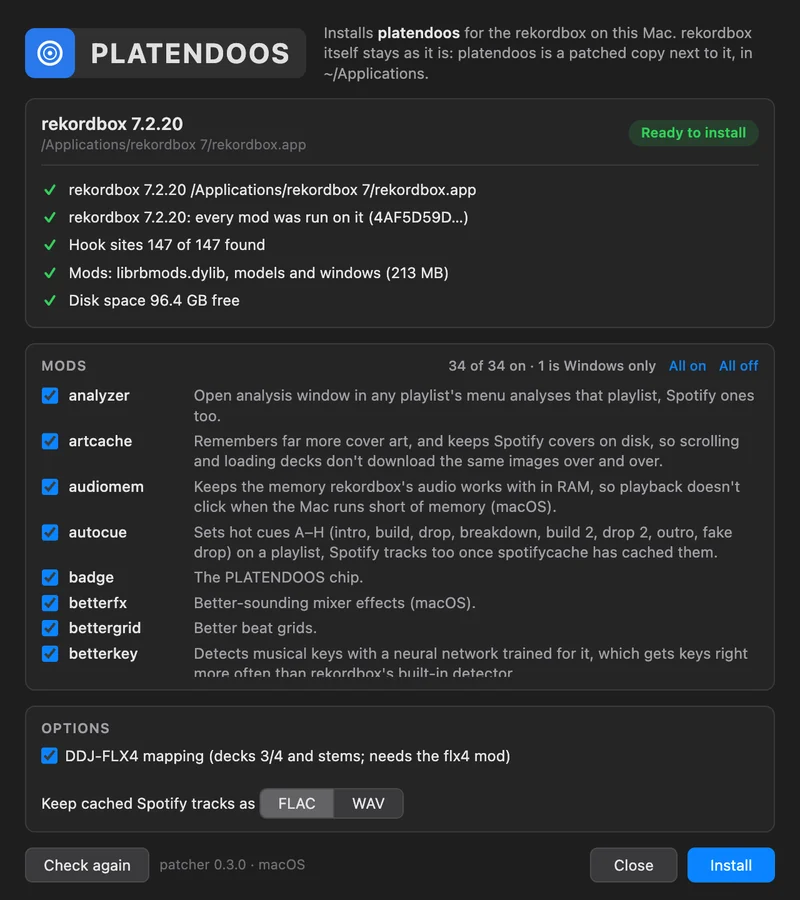
What the install makes: ~/Applications/platendoos.app, a copy of rekordbox whose program is patched to load the mods, with the mods' models and windows, the FLX4 mapping and an inverted icon, signed for that Mac. On APFS the copy takes no extra space. rekordbox itself isn't changed, and its own signature is kept.
Windows
- Unzip
platendoos-windows-<version>.zipanywhere and open theplatendoosfolder. Keep the folder whole: the patcher needs the files next to it. - Close rekordbox. The patcher won't install while rekordbox is open.
- Run platendoos patcher.exe. It isn't signed, so SmartScreen may warn: click More info, then Run anyway.
- Check. The window finds the newest rekordbox in Program Files and checks it.
- Choose your mods and options, including Desktop shortcut (Windows only).
- Click Install. The patcher copies platendoos to
%LOCALAPPDATA%\Programs\platendoos, with a Start menu shortcut (and a desktop one if ticked) and an entry in Apps & features, with rekordbox's icon inverted as on macOS. If the DDJ-FLX4 option is on, Windows asks for permission to change rekordbox's FLX4 mapping. - Start platendoos from the Start menu (or with the patcher's button).
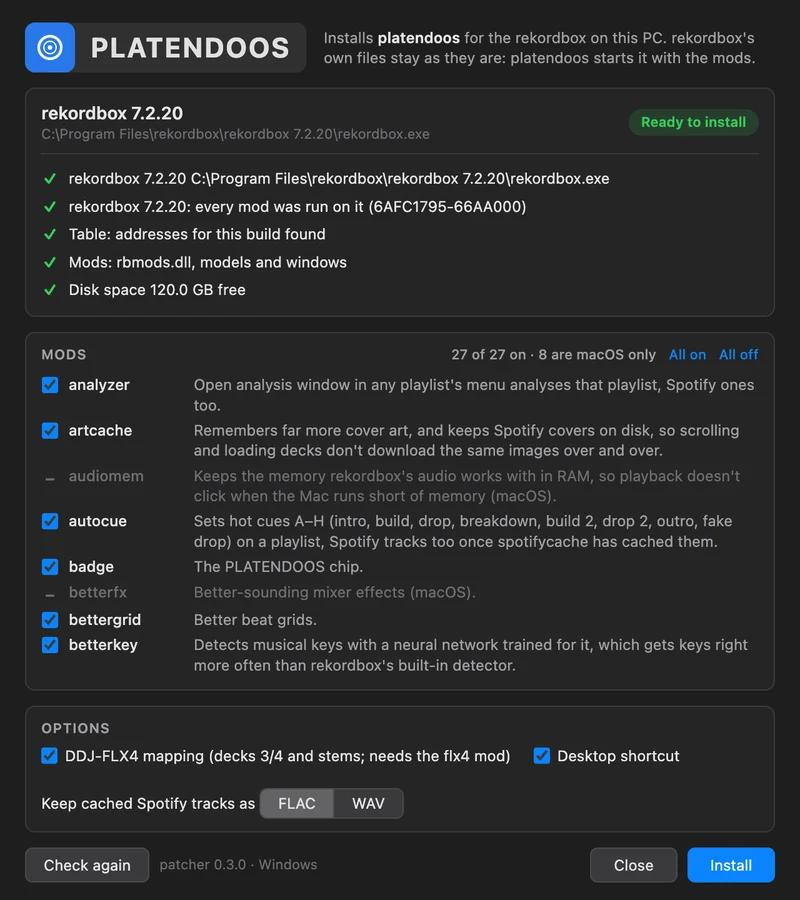
rekordbox's own files aren't changed, except the DDJ-FLX4 mapping when that option is on: rekordbox's own mapping is kept as DDJ-FLX4.midi.csv.original and put back on uninstall.
You can also skip the patcher: copy the platendoos folder anywhere and start platendoos.exe from it. It finds rekordbox by itself (platendoos.exe --rekordbox <path to rekordbox.exe> otherwise).
The patcher's window
The window checks everything before it changes anything.
rekordbox. The version and where it is, then a list of checks, each with a ✓ (fine), ! (a warning) or ✕ (stops the install):
| Check | What it means |
|---|---|
| rekordbox | Found, with its path. Not found: install rekordbox 7 from rekordbox.com first, then press Check again. |
| Build | Whether this is the build platendoos was tested with (7.2.19), one every mod was run on (7.2.20), or an untested one (a warning: the mods find rekordbox's code by name, and mods whose code changed switch themselves off). |
| Hook sites (macOS) | How many of the calls the mods take over were found in this rekordbox, e.g. 147 of 147 found. |
| Table (Windows) | Whether the patcher has an address table for this build, or made one from its signatures (it then says how many parts it found). |
| Mods | The patcher's own files: the mods' library, models and windows. Missing: download the patcher again (on Windows, unzip the whole folder). |
| Disk space | Free space against what the install needs. |
| platendoos | Whether it's already installed, and whether it's open (it is closed while it's updated). |
Under the checks, anything you need to do first is spelled out: close rekordbox (Windows), an untested or unsupported version, a rekordbox that was already changed, not enough disk space.
Mods. A checkbox per mod, all on by default, with All on and All off. The count says how many are on and how many are for the other platform only (greyed out). Your choices go into the config file as <mod>=0 lines when you install, and the window starts from what the config says next time.
Options.
| Option | What it does |
|---|---|
| DDJ-FLX4 mapping | Adds decks 3 and 4 and the stems rows to rekordbox's DDJ-FLX4 mapping. Needs the flx4 mod. |
| Desktop shortcut | Windows only. |
| Buttons. Install (or Update when platendoos is already installed), Check again, Uninstall, *Show in | |
| Finder* / Show in Explorer, Start platendoos, Close. If something fails, the window says what, and that | |
| nothing of rekordbox's own was changed; the log in the window says how far it got. |
After a rekordbox update
Run the patcher again. It rebuilds platendoos for the new rekordbox (the button then says Update). On macOS the copy is made from the updated rekordbox; on Windows the patcher writes the address table for the new build.
- A version the patcher knows (7.2.19, 7.2.20): every mod on.
- A newer version: the window warns that platendoos hasn't been tested with it. On macOS, any mod whose code changed switches itself off and the rest keep working. On Windows the patcher makes a table on the spot and says how many of the parts it found; mods missing one are shown as off.
- A version that's too different: the patcher says so and changes nothing. Keep using rekordbox plain, or the older rekordbox, until a new patcher is out.
The PLATENDOOS chip then says untested rekordbox build: some mods may be off; its window lists every mod and whether it's on.
Uninstalling
Run the patcher and click Uninstall. Your rekordbox library, its settings and the mods' caches stay. On macOS this moves ~/Applications/platendoos.app to the Trash; on Windows the installed folder, the shortcuts and the Apps & features entry, and the original DDJ-FLX4 mapping is put back.
To remove everything the mods kept, also delete these folders (after uninstalling):
| macOS | Windows | |
|---|---|---|
| Config | ~/Library/Application Support/rekordbox-mods/ | %APPDATA%\rekordbox-mods\ |
| Caches | ~/Library/Caches/rekordbox-mods/ | %LOCALAPPDATA%\rekordbox-mods\cache\ |
| Log | ~/Library/Logs/rekordbox-mods.log | %LOCALAPPDATA%\rekordbox-mods\rekordbox-mods.log |
From the command line
The patcher does the same without its window:
# macOS
"platendoos patcher.app/Contents/MacOS/platendoos patcher" --check
"platendoos patcher.app/Contents/MacOS/platendoos patcher" --install
"platendoos patcher.app/Contents/MacOS/platendoos patcher" --uninstall:: Windows (a window program: redirect the output to a file to read it)
"platendoos patcher.exe" --check > check.txt--checkprints what the window would show (the checks, the notes for you, the mods, which mods are turned off in the config, the destination) with the technical details: build, hook sites, address table. It exits with 0 when the rekordbox can be installed for, 1 otherwise.--installinstalls with the mod choices from the config.--uninstalluninstalls.
For testing: PLATENDOOS_SOURCE=<rekordbox.app, or on Windows rekordbox.exe> takes that rekordbox instead of the installed one (for example a new version unpacked from its installer), and PLATENDOOS_DEST=<a folder> installs there instead (on Windows without shortcuts or Apps & features entry; PLATENDOOS_FLX4=0 leaves the FLX4 mapping alone).
Next: first steps.